Feature Flags Without an IdP: Email‑Scoped JWTs with OpenFeature + DevCycle

Progressive delivery without a full identity provider. Use a tiny JWT issuer and OpenFeature with DevCycle to gate experiences by email
Overview
Feature flags enable you to ship code to production behind a safety net. My workflow is straightforward: I deploy with the flag off, enable it for myself first, then for my team, then for internal testers, and finally let the product manager complete the last mile. That flow requires knowing who the user is, but for demos and internal environments, a full identity provider is overkill.
Over the weekend, I built jwt-email-issuer, an Express middleware and React hook that issues short‑lived JWTs based on an email. Pair it with OpenFeature and DevCycle, and you can demonstrate frontend and backend flagging with a handful of lines.
What we’ll build
- API — an Express service that evaluates a DevCycle flag via OpenFeature and includes the Issuer
- Web — a React demo that fetches a token and calls the API.
- Two flows — “beta” for a targeted email and “classic” for everyone else.
DevCycle flag
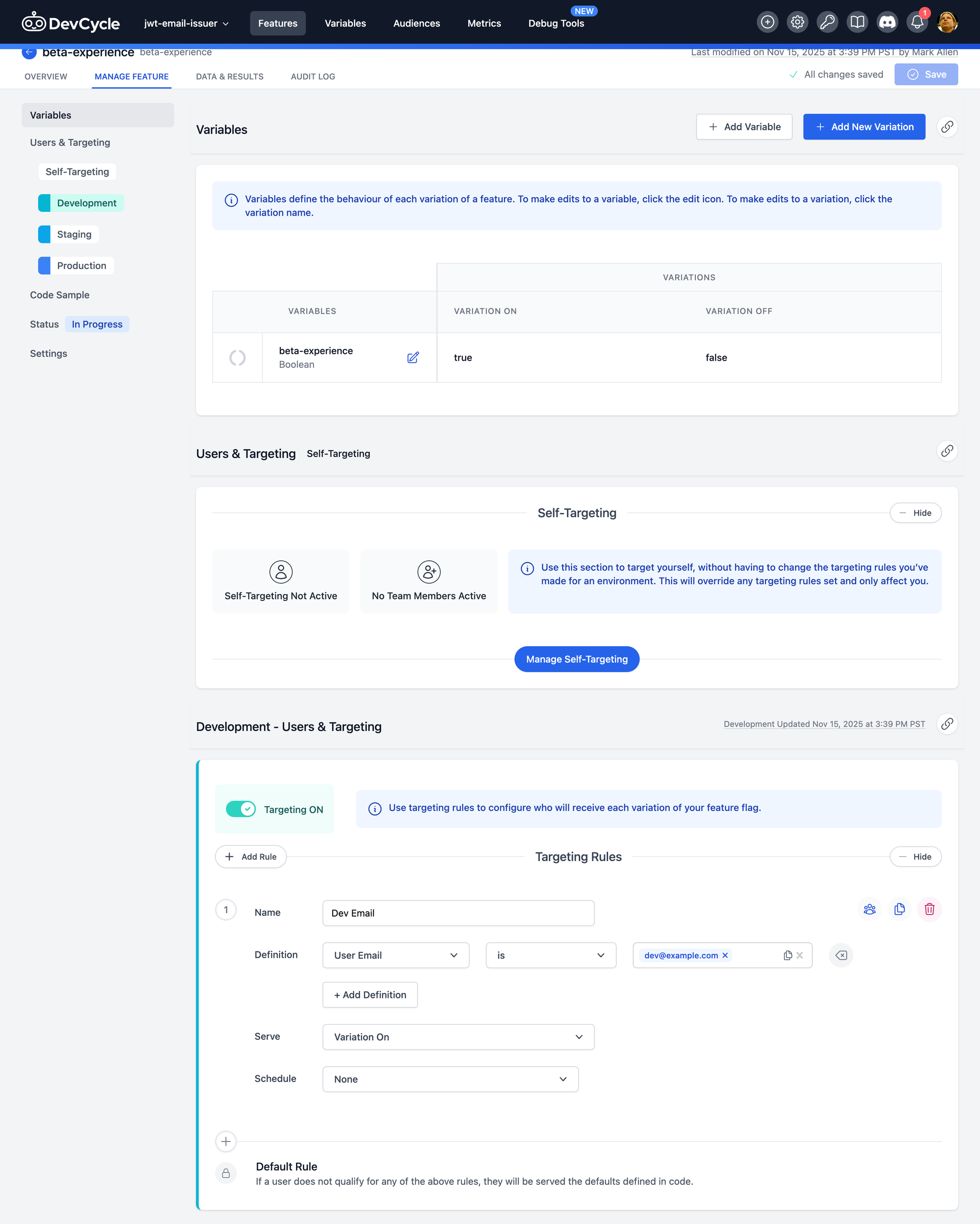
Log in to your DevCycle console and create a Boolean flag with the key beta-experience.
I use DevCycle because it lets me have a free account for less than 1000 Monthly Active Users (MAUs)
Targeting rule called "Dev Email":
- If email equals
dev@example.com→ true (beta) - Default → false (classic) - will be set in the code
Express Server (Ingress + DevCycle + OpenFeature)
Create the Express Server
If you need a TypeScript NodeJS starter, see my setup guide: https://www.markcallen.com/typescript-for-node/
Start by adding an express server with the jwt-email-issuer package.
yarn add jwt-email-issuer express cors dotenv
yarn add -D @types/express @types/cors
Then, create a simple issuer server to obtain a JWT for an email address.
// src/server.ts
import express from 'express';
import cors from 'cors';
import 'dotenv/config';
import { createJwtRouter } from 'jwt-email-issuer/express';

const app = express();
app.use(cors({ origin: ['http://localhost:5173', 'http://localhost:4173'], credentials: true }));
app.use(express.json());

app.use(
  createJwtRouter({
    issuer: 'com.example.issuer',
    audience: 'com.example.web',
    expiresIn: '10m',
  }),
);

app.listen(3000, () => console.log('Express on http://localhost:3000'));
Add scripts to build and start:
npm pkg set "scripts.build"="rimraf ./dist && tsc"
npm pkg set "scripts.start"="node dist/server.js"
Start the server
yarn build && yarn startRequest a token:
curl -s -X POST http://localhost:3000/.well-known/token \
  -H "Content-Type: application/json" \
  -d '{"email":"dev@example.com"}' | jq -r .token
Use the decoder at https://www.jwt.io/ to check to see that the token is correct:
{
  "sub": "dev@example.com",
  "email": "dev@example.com",
  "iss": "com.example.issuer",
  "aud": "com.example.web",
  "iat": 1763258623,
  "exp": 1763259223
}
Add in OpenFeature + DevCycle
Now, let's add the OpenFeature provider for DevCycle on the backend.
yarn add @openfeature/server-sdk @devcycle/nodejs-server-sdkAnd exclude some directories we don't need typescript to compile:
npx json -I -f tsconfig.json -e "this.exclude = ['node_modules', 'dist', 'web']"We'll need to get our DevCycle Server API key from their UI and add it to our .env file.
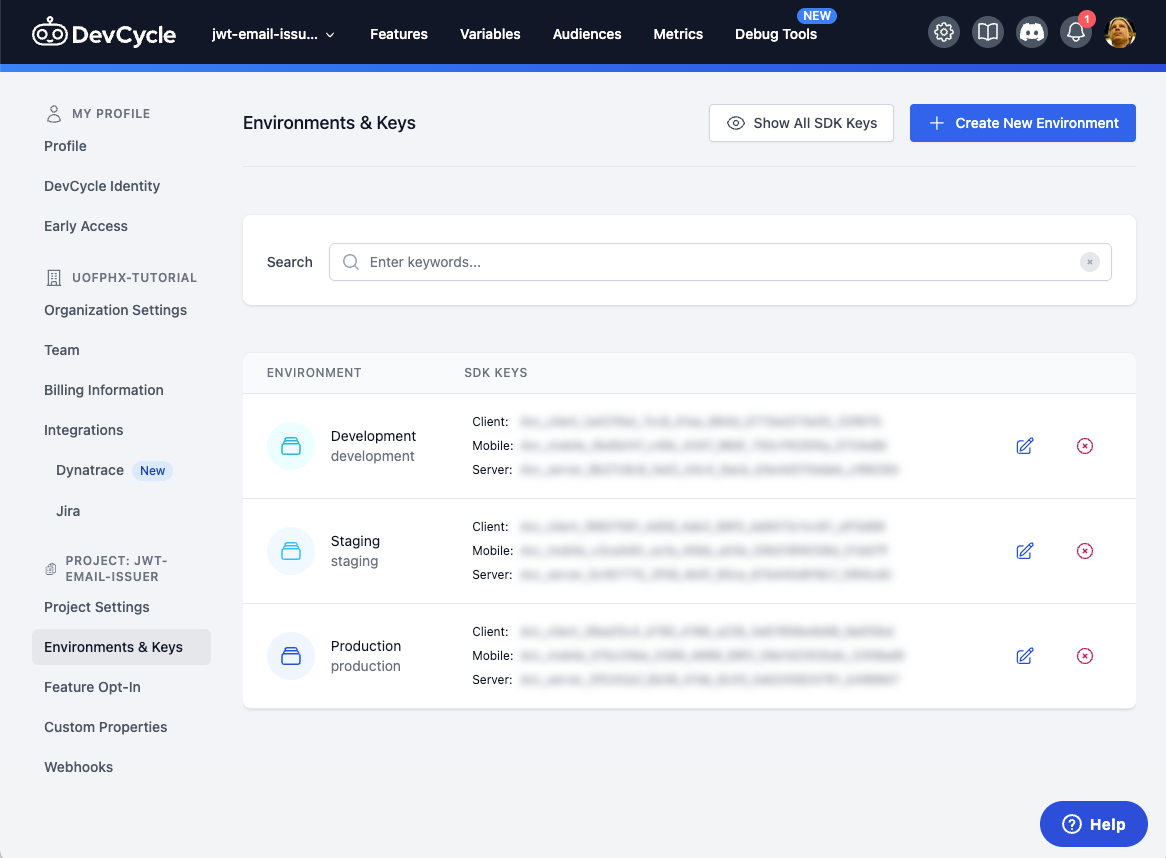
DVC_SERVER_SDK_KEY=dvc_server_...Now, let's configure OpenFeature with the DevCycle SDK.
import { OpenFeature } from '@openfeature/server-sdk';
import { DevCycleProvider } from '@devcycle/nodejs-server-sdk';

const DVC_KEY = process.env.DVC_SERVER_SDK_KEY || '';
const FLAG_KEY = 'beta-experience';

OpenFeature.setProviderAndWait(new DevCycleProvider(DVC_KEY));
const client = OpenFeature.getClient();
Now with an endpoint that will use this feature flag:
  app.get('/api/experience', async (req, res) => {
    const auth = req.header('authorization') || '';
    if (!auth.startsWith('Bearer ')) return res.status(401).json({ error: 'Missing token' });
    const token = auth.substring('Bearer '.length);

    // Demo only: decode instead of verify. For production, use jwt.verify and validate iss/aud/exp.
    const payload = jwt.decode(token) as { email?: string } | null;
    const email = payload?.email;
    if (!email) return res.status(400).json({ error: 'Token missing email' });

    const context = { targetingKey: email, email };
    const enabled = await client.getBooleanValue(FLAG_KEY, false, context);

    if (enabled) {
      return res.json({
        email, flag: FLAG_KEY, enabled, variant: 'beta',
        message: `Welcome to the new experience, ${email}!`,
        ui: { theme: 'v2', showNewDashboard: true, quickActions: ['Create Project','Invite Teammate','AI Assist'] },
      });
    }

    return res.json({
      email, flag: FLAG_KEY, enabled, variant: 'classic',
      message: `Hello ${email}. You’re on the stable experience.`,
      ui: { theme: 'v1', showNewDashboard: false, quickActions: ['Create Project'] },
    });
  });
Create a bearer token above and use it to check that the endpoint works:
curl -H 'authorization: Bearer ey...' http://localhost:3000/api/experienceReturns:
{
  "email": "dev@example.com",
  "flag": "beta-experience",
  "enabled": true,
  "variant": "beta",
  "message": "Welcome to the new experience, dev@example.com!",
  "ui": {
    "theme": "v2",
    "showNewDashboard": true,
    "quickActions": [
      "Create Project",
      "Invite Teammate",
      "AI Assist"
    ]
  }
}
Now, if we create a token with a different email address:
curl -s -X POST http://localhost:3000/.well-known/token \
  -H "Content-Type: application/json" \
  -d '{"email":"ops@example.com"}' | jq -r .token
We get the other option:
{
  "email": "ops@example.com",
  "flag": "beta-experience",
  "enabled": false,
  "variant": "classic",
  "message": "Hello ops@example.com. You're on the stable experience.",
  "ui": {
    "theme": "v1",
    "showNewDashboard": false,
    "quickActions": [
      "Create Project"
    ]
  }
}
Web (React + Vite)
Create a Vite app
If you need a Vite starter, see my setup guide: https://www.markcallen.com/getting-started-with-vite-react-typescript/
The backend is working as we want; now we need to create a frontend using vite.
Create the vite app in the web directory:
npm create vite@latest web -- --template react-ts

# add jwt-email-issuer
yarn add jwt-email-issuer

# run in dev mode
yarn dev
Replace the App.tsx with this page
// web/src/App.tsx
import { useState } from 'react';
import { useJwtToken } from 'jwt-email-issuer/react';
import './App.css';

export default function App() {
  const serverUrl = import.meta.env.VITE_API_URL ?? 'http://localhost:3000';

  const [email, setEmail] = useState('dev@example.com');
  const [result, setResult] = useState<string | null>(null);
  const { token, loading, error, fetchToken } = useJwtToken({
    serverUrl,
    email,
  });
  const login = async () => { await fetchToken(); };
  const checkFeature = async () => {
    if (!token) return;
    const res = await fetch(`${serverUrl}/api/experience`, { headers: { Authorization: `Bearer ${token}` } });
    setResult(await res.json());
  };

  return (
    <div className="app">
      <div className="card">
        <header>
          <h1>JWT Email Issuer Demo</h1>
          <p>Test feature flags with email-based targeting</p>
        </header>
        <div className="content">
          <label>Email for targeting</label>
          <input type="email" value={email} onChange={(e) => setEmail(e.target.value)} placeholder="Enter email" />
          <div className="buttons">
            <button className="primary" onClick={login} disabled={loading}>
              {loading ? 'Issuing...' : 'Get Token'}
            </button>
            <button onClick={checkFeature} disabled={!token || loading}>Check Experience</button>
          </div>
          {error && <div className="error">⚠️ Token error: {String(error)}</div>}
          {token && !error && <div className="success">✓ Token issued</div>}
          {result && (
            <div>
              <h3>API Response</h3>
              <pre>{JSON.stringify(result, null, 2)}</pre>
            </div>
          )}
        </div>
      </div>
    </div>
  );
}
You can find the new App.css here.
To run it in dev mode:
yarn devOpen up the vite default page http://localhost:5173/
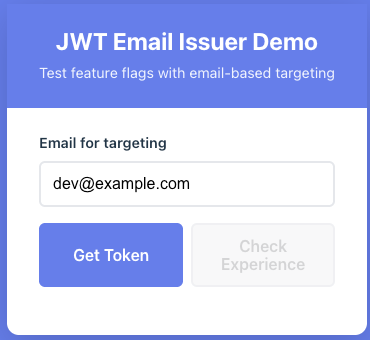
Get Token and Check the Experience, and you'll see the correct data for the feature flag:

DevCycle and OpenFeature in React
Let's add OpenFeature and the DevCycle React SDK to the vite app so that we only show this new feature to developers in the example.com email domain.
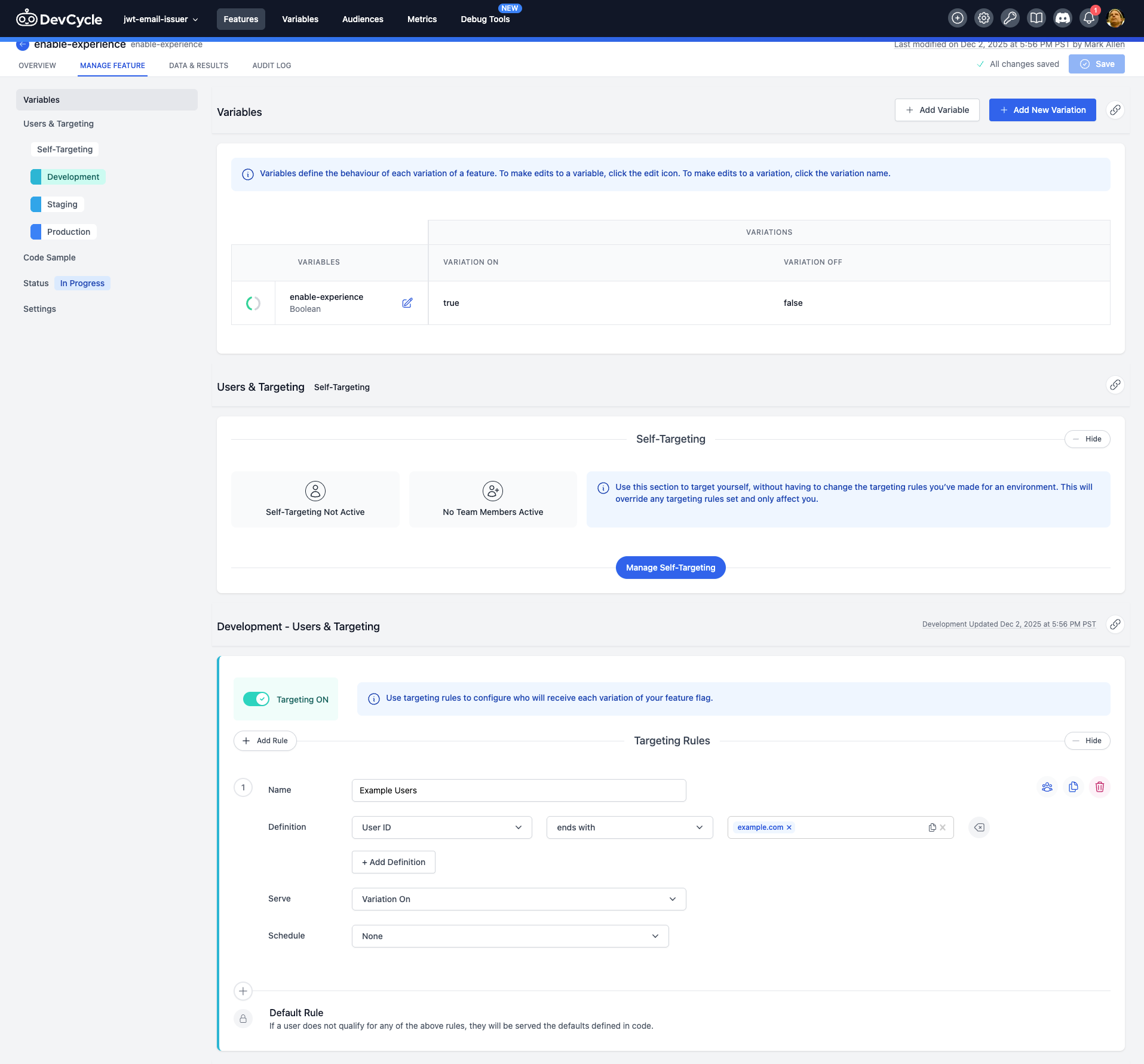
First, we'll have to add a new feature flag to DevCycle
Targeting rule called "Example Users":
- If User Id ends with
@example.com→ true - Default → false - will be set in the code
Using User Id here as it is supported by OpenFeature.
Add OpenFeature and DevCycle React provider to this app:
yarn add @openfeature/react-sdk @devcycle/openfeature-react-provider @openfeature/web-sdk @openfeature/coreAdd the OpenFeature provider to the main.tsx and use your DevCycle client key:
import {
  OpenFeatureProvider,
  OpenFeature,
} from '@openfeature/react-sdk'
import DevCycleReactProvider from '@devcycle/openfeature-react-provider'

await OpenFeature.setContext({ user_id: 'user_id' })
await OpenFeature.setProviderAndWait(
  new DevCycleReactProvider('dvc_client_...'),
)

createRoot(document.getElementById('root')!).render(
  <StrictMode>
    <OpenFeatureProvider>
      <App />
    </OpenFeatureProvider>
  </StrictMode>,
)
Now get the experience-enabled feature flag on the App.tsx page and use a useEffect to set the OpenFeature context's user_id field when the email address is changed in the text field.
import { useState, useEffect } from 'react';
import { useBooleanFlagValue } from '@openfeature/react-sdk';

export default function App() {
...
    const experienceEnabled = useBooleanFlagValue('enable-experience', false);

    useEffect(() => {
      OpenFeature.setContext({ user_id: email })
        .catch((error) => {
          console.error('Error setting context:', error);
        });
    }, [email]);
...
Then update the HTML to show the buttons if the flag is enabled:
          {experienceEnabled && (
            <>
              <div className="buttons">
                <button className="primary" onClick={login} disabled={loading}>
                  {loading ? 'Issuing...' : 'Get Token'}
                </button>
                <button onClick={checkFeature} disabled={!token || loading}>Check Experience</button>
              </div>
              {error && <div className="error">⚠️ Token error: {String(error)}</div>}
              {token && !error && <div className="success">✓ Token issued</div>}
              {result && (
                <div>
                  <h3>API Response</h3>
                  <pre>{JSON.stringify(result, null, 2)}</pre>
                </div>
              )}
            </>
          )}
Now, since the default email address ends in @example.com they will show up.
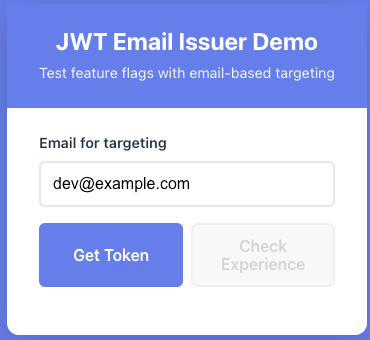
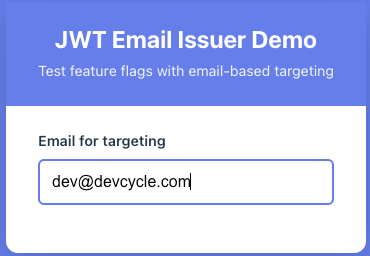
But if you change the email address, they will disappear:
Serve from the Express App
Compile the vite app:
yarn buildand add the following route to src/server.ts
// Serve static files from web/dist
app.use(express.static(path.join(__dirname, '../web/dist')));

// Catch-all handler for SPA routing - serve index.html for all non-API routes
app.use((req, res, next) => {
  // Don't serve index.html for API routes
  if (req.path.startsWith('/api')) {
    return res.status(404).json({ error: 'Not found' });
  }
  // Serve index.html for all other routes (SPA fallback)
  res.sendFile(path.join(__dirname, '../web/dist/index.html'));
});
Restarting the express app you can get to the front end at http://localhost:3000
You now have two flows without an IdP, which is perfect for demonstrating progressive delivery: enable yourself first, then your team, then internal testers, and finally hand control to your PM.
I've shared this project on github as an example: https://github.com/markcallen/jwt-email-issuer-example